Appearance
UI Styling
The haskoning_equation package provides a comprehensive styling system for building consistent and interactive user interfaces. This includes styling for charts, tables, and individual form fields.
Overview
The styling system provides three main capabilities:
- CardStyle — Consistent card-like styling for components with titles, subtitles, and icons
- FieldStyle — Control UI rendering of individual form fields
- Component Styling — Material Design Icons (MDI) support and theming
CardStyle
CardStyle applies consistent card-like styling to chart or input components. It can be used at the field level or class level.
Split-layout: Field-Level Styling
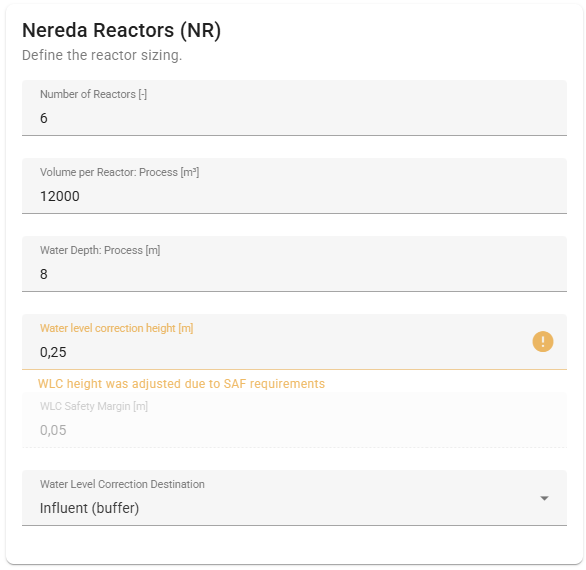
This is the way to style a Split-layout application. An example is given here of a single panel in the UI. Field titles, descriptions and default values can be used to customize the way input fields are displayed. To style the panel itself, embed a CardStyle in a Pydantic field's json_schema_extra. Note the nesting of the basemodels in this example.
python
from enum import StrEnum
from pydantic import BaseModel, Field
from haskoning_equation.style import FloatFieldStyle
from haskoning_equation.units import units

class WlcDestination(StrEnum):
    INFLUENT = "Influent (buffer)"
    WLC_BUFFER = "WLC Buffer"
    EFFLUENT = "Effluent"
    OUT_OF_SCOPE = "Outside the Nereda-scope"

class NeredaReactorSizing(InputBaseModel):
    number_reactors: Annotated[int, Field(
        title="Number of Reactors",
        description="Number of reactors",
        ge=1,
        default=6,
        json_schema_extra={'unit': units.DIMENSIONLESS},
    )]
    reactor_volume: Annotated[float, Field(
        title="Volume per Reactor: Process",
        description="Process volume of a reactor. Possibly includes extra volume to "
        "accommodate the transition of DWF to RWF in case of CF without and IB.",
        ge=100,
        default=12000,
        json_schema_extra={'unit': units.VOLUME_STANDARD},
    )]
    water_depth_process: Annotated[float, Field(
        title="Water Depth: Process",
        description="Water depth when the reactor is aerating",
        ge=4.5,
        default=8.0,
        json_schema_extra={'unit': units.LENGTH_STANDARD},
    )]
    wlc_height: Annotated[float, Field(
        title="Water level correction height",
        description="Height for the water level correction (minimum value: 0.15 m)",
        default=0.15,
        ge=0.15,
        json_schema_extra={'unit': units.LENGTH_STANDARD},
    )]
    wlc_safety_margin: Annotated[float, Field(
        title="WLC Safety Margin",
        description="Safety margin for the water level correction",
        default=0.05,
        frozen=True,
        json_schema_extra={
            'unit': units.LENGTH_STANDARD,
            'style': FloatFieldStyle(disabled=True),
        },
    )]
    wlc_destination: Annotated[WlcDestination, Field(
        title="Water Level Correction Destination",
        description="Destination of WLC Discharge (if SAF it is backup WLC destination)",
        default=WlcDestination.INFLUENT,
    )]
    sludge_discharge_height_cache: Annotated[float, Field(
        default=0,
        json_schema_extra={
            'unit': units.LENGTH_STANDARD,
            'style': FloatFieldStyle(disabled=True, hidden=True)})]

class ProcessSetup(InputBaseModel):
    nereda_reactors_sizing: NeredaReactorSizing = Field(
        NeredaReactorSizing(),
        json_schema_extra={
            'style': CardStyle(
                title="Nereda Reactors (NR)",
                subtitle="Define the reactor sizing."
            )
        }
    )
This leads to the following UI panel:
Combined-layout: Class-Level Styling
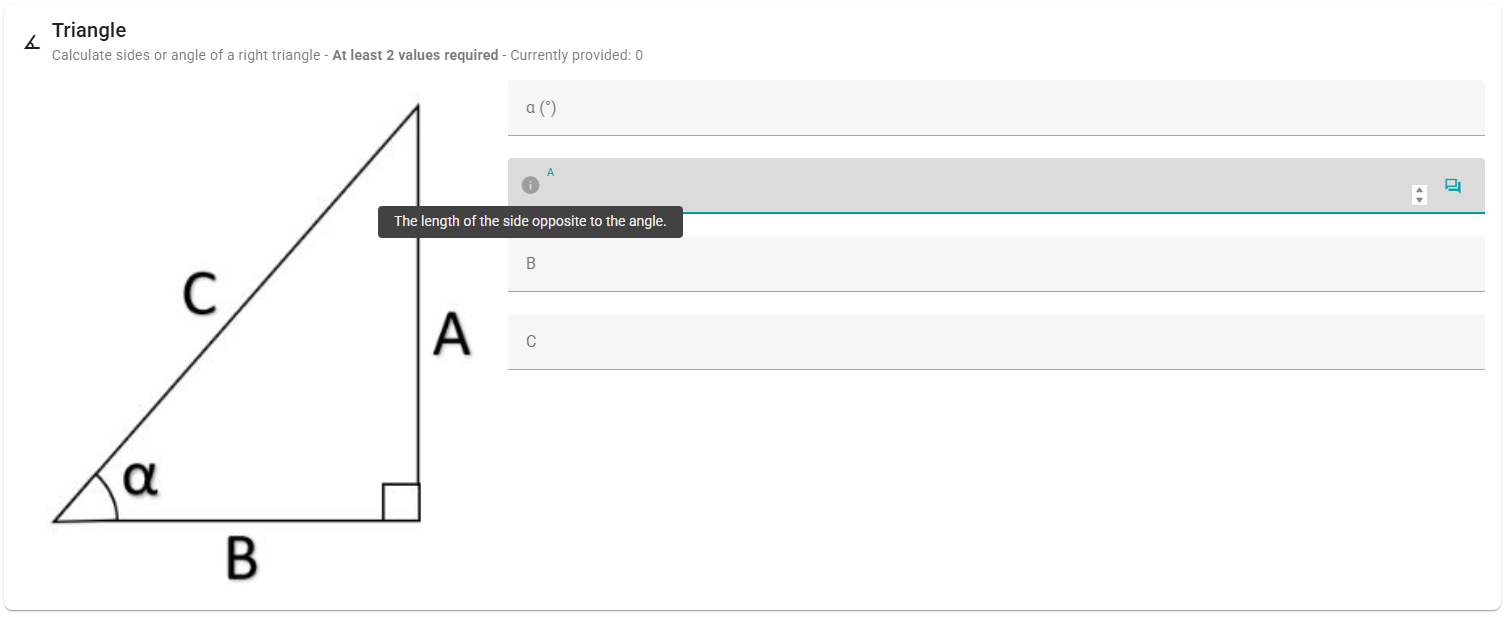
Use the way below to style a combined-layout application. Use the @apply_style decorator to attach a style to an entire model:
python
from pydantic import BaseModel, Field
from haskoning_equation.style import apply_style, CardStyle

@apply_style(
    style=CardStyle(
        title="Triangle",
        subtitle="Calculate sides or angle of a right triangle",
        icon="mdi-angle-acute",
        min_inputs=2,
        image_url="/haskoning_basic_hydraulics/static/images/driehoek.jpg",
    )
)
class TriangleInput(BaseModel):
    angle: float | None = Field(
        default=None, title="α (°)", description="The angle of the triangle in degrees."
    )
    opposite: float | None = Field(
        default=None, title="A", description="The length of the side opposite to the angle."
    )
    adjacent: float | None = Field(
        default=None,
        title="B",
        description="The length of the side adjacent to the angle.",
    )
    hypotenuse: float | None = Field(
        default=None, title="C", description="The length of the hypotenuse."
    )

    @model_validator(mode="after")
    def check_at_least_two(self) -> Self:
        check_minimum_number_of_inputs(self, 2)
        return self
The result of this in the ui is:
FieldStyle
FieldStyle classes control UI rendering of individual fields. Use them in json_schema_extra to specify control type, disabled state, or visibility.
Available FieldStyle Classes
| Class | Field Type | UI Controls | Default | Example Usage |
|---|---|---|---|---|
BooleanFieldStyle | bool | switch, select | switch | BooleanFieldStyle() |
IntegerFieldStyle | int | slider, textfield | textfield | IntegerFieldStyle(type="slider") |
FloatFieldStyle | float | slider, textfield | textfield | FloatFieldStyle(disabled=True) |
StringFieldStyle | str | textfield, textarea | textfield | StringFieldStyle() |
EnumFieldStyle | Enum | select | select | EnumFieldStyle() |
All styles support disabled, hidden, cols, offset, and css options for additional UI control.
Example Usage
python
from typing import Annotated

from pydantic import Field
from haskoning_equation.models import InputBaseModel
from haskoning_equation.style import IntegerFieldStyle, FloatFieldStyle
from haskoning_equation.units import units

class ScenarioSettings(InputBaseModel):
    scenario_duration: Annotated[int, Field(
        title="Scenario duration",
        description="Total scenario duration",
        default=24 * 60,
        ge=0,
        json_schema_extra={
            'unit': units.TIME_PHASE,
            'style': IntegerFieldStyle(type="slider"),
        },
    )]
    general_load_factor: Annotated[float, Field(
        title="General load factor",
        description="Load factor for the design",
        default=1,
        ge=0,
        json_schema_extra={
            'unit': units.DIMENSIONLESS,
            'style': FloatFieldStyle(disabled=True),
        },
    )]
Working with Charts
ChartSchema
ChartSchema provides type-safe ChartJS configurations. Below are examples for common chart types.
Line Chart Example
python
import math
import random

from haskoning_equation.style.chartjs_pydantic import (
    ChartSchema, ChartType, ChartData, Dataset, ChartOptions,
    PluginsOptions, LegendOptions, PositionType, ScalesOptions,
    AxisOptions, InteractionOptions, InteractionMode
)

def create_default_line_chart_data(num_minutes: int = 1440) -> ChartSchema:
    oxygen_data = []
    redox_data = []

    for i in range(0, num_minutes, 10):
        phase = (i % num_minutes) / num_minutes * 2 * math.pi
        oxygen_y = 1 + math.sin(phase) + random.uniform(-0.2, 0.2)
        if oxygen_y < 0:
            oxygen_y = 0
        redox_y = 0 + 100 * math.cos(phase) + random.uniform(-10, 10)
        if redox_y < -100 or redox_y > 100:
            redox_y = max(min(redox_y, 100), -100)
        oxygen_data.append({'x': i / 60, 'y': oxygen_y})
        redox_data.append({'x': i / 60, 'y': redox_y})

    datasets = [
        Dataset(
            label="Oxygen",
            data=oxygen_data,
            backgroundColor='#89b0e9',
            borderWidth=2,
            fill=True,
            yAxisID='y',
            tension=0.4,
            pointRadius=0
        ),
        Dataset(
            label="Redox",
            data=redox_data,
            backgroundColor='#605d5b',
            borderWidth=2,
            fill=False,
            yAxisID='y1',
            tension=0.4,
            pointRadius=0
        )
    ]

    data = ChartData(datasets=datasets)
    options = ChartOptions(
        responsive=True,
        maintainAspectRatio=False,
        interaction=InteractionOptions(
            mode=InteractionMode.INDEX,
            intersect=False
        ),
        plugins=PluginsOptions(
            legend=LegendOptions(
                position=PositionType.TOP,
            )
        ),
        scales=ScalesOptions(
            x=AxisOptions(
                display=True,
                title={'display': True, 'text': 'Hours'},
                type="linear",
            ),
            y=AxisOptions(
                display=True,
                position=PositionType.LEFT,
                title={'display': True, 'text': 'mg/L'},
                type="linear",
            ),
            y1=AxisOptions(
                display=True,
                position=PositionType.RIGHT,
                title={'display': True, 'text': 'mV'},
                type="linear",
            ),
        )
    )

    return ChartSchema(
        type=ChartType.LINE,
        data=data,
        options=options
    )
Scatter Chart Example
python
import random

from haskoning_equation.style.chartjs_pydantic import (
    ChartSchema, ChartType, ChartData, Dataset, ChartOptions,
    PluginsOptions, LegendOptions, PositionType, ScalesOptions, AxisOptions
)

def create_default_scatter_chart_data(num_days: int = 30) -> ChartSchema:
    reactor_01_points = []
    reactor_02_points = []

    for i in range(num_days):
        reactor_01_points.append({'x': i, 'y': random.uniform(1000, 14000)})
        reactor_02_points.append({'x': i, 'y': random.uniform(1000, 14000)})

    datasets = [
        Dataset(
            label="Reactor 01",
            data=reactor_01_points,
            backgroundColor='#5ea054',
            pointRadius=6
        ),
        Dataset(
            label="Reactor 02",
            data=reactor_02_points,
            backgroundColor='#edcc21',
            pointRadius=6
        )
    ]

    data = ChartData(datasets=datasets)
    options = ChartOptions(
        responsive=True,
        maintainAspectRatio=False,
        plugins=PluginsOptions(
            legend=LegendOptions(
                position=PositionType.TOP,
            )
        ),
        scales=ScalesOptions(
            x=AxisOptions(
                display=True,
                title={'display': True, 'text': 'Dates'},
                type="linear",
            ),
            y=AxisOptions(
                display=True,
                position=PositionType.LEFT,
                title={'display': True, 'text': 'Feed flow per day'},
                type="linear",
            ),
        )
    )

    return ChartSchema(
        type=ChartType.SCATTER,
        data=data,
        options=options
    )
State Timeline Chart Example
python
from haskoning_equation.style.chartjs_pydantic import (
    ChartSchema, ChartType, ChartData, Dataset, ChartOptions,
    PluginsOptions, LegendOptions, PositionType, ScalesOptions, AxisOptions
)

def create_default_state_timeline_chart_data(
        reactor_names=None, num_cycles: int = 8) -> ChartSchema:
    if reactor_names is None:
        reactor_names = ["Reactor01", "Reactor02"]
    react_intervals = []
    settle_intervals = []
    feed_decant_intervals = []

    for reactor_name in reactor_names:
        current_time = 0
        for cycle in range(num_cycles):
            react_intervals.append(
                {'x': [current_time, current_time + 2], 'y': reactor_name})
            current_time += 2

            settle_intervals.append(
                {'x': [current_time, current_time + 0.5], 'y': reactor_name})
            current_time += 0.5

            feed_decant_intervals.append(
                {'x': [current_time, current_time + 0.5], 'y': reactor_name})
            current_time += 0.5

    datasets = [
        Dataset(label="React", data=react_intervals, backgroundColor='#adcdfe'),
        Dataset(label="Settle", data=settle_intervals, backgroundColor='#8ac082'),
        Dataset(label="Feed/Decant", data=feed_decant_intervals, backgroundColor='#5984c8')
    ]

    data = ChartData(datasets=datasets)
    options = ChartOptions(
        indexAxis='y',
        responsive=True,
        maintainAspectRatio=False,
        plugins=PluginsOptions(
            legend=LegendOptions(position=PositionType.TOP)
        ),
        scales=ScalesOptions(
            x=AxisOptions(
                display=True,
                title={'display': True, 'text': 'Hours', 'padding': {'top': 10}},
                type="linear",
            ),
            y=AxisOptions(
                display=True,
                title={'display': True, 'text': 'Reactors'},
                stacked=True,
            ),
        )
    )
    return ChartSchema(type=ChartType.BAR, data=data, options=options)
Working with Tables
TableSchema
TableSchema provides type-safe table configurations with support for nested headers, styling, and units.
Table with Nested Headers
python
from pydantic import BaseModel, ConfigDict
from haskoning_equation.style import CardStyle, FloatFieldStyle
from haskoning_equation.style.tables import TableHeader, TableSchema, TableSubHeader

class TableItemSchema(BaseModel):
    model_config = ConfigDict(validate_assignment=True, extra="allow")

typology_overview = TableSchema(
    headers=[
        TableHeader(title="Typology ID", key="typo_id", sortable=True),
        TableHeader(title="Typology spaces", key="typo_n_spaces", sortable=True),
        TableHeader(
            title="Typology area",
            key="typo_area",
            sortable=True,
            style=FloatFieldStyle(type="number", precision=1),
        ),
        TableHeader(
            title="Ventilation",
            children=[
                TableSubHeader(
                    title="Specified Supply Airflow",
                    key="typo_Specified Supply Airflow",
                    style=FloatFieldStyle(type="number", precision=1),
                ),
                TableSubHeader(
                    title="Specified Return Airflow",
                    key="typo_Specified Return Airflow",
                    style=FloatFieldStyle(type="number", precision=1),
                ),
            ],
        ),
    ],
    items=[
        TableItemSchema(**{
            "typo_id": "Office",
            "typo_n_spaces": 10,
            "typo_area": 250.5,
            "typo_Specified Supply Airflow": 300.0,
            "typo_Specified Return Airflow": 290.0,
        }),
        TableItemSchema(**{
            "typo_id": "Meeting room",
            "typo_n_spaces": 4,
            "typo_area": 120.0,
            "typo_Specified Supply Airflow": 150.0,
            "typo_Specified Return Airflow": 140.0,
        }),
    ],
    style=CardStyle(
        title="Typology overview",
        subtitle="Overview of all typologies in the project",
    ),
)
Editable Table with Hidden Columns
python
from pydantic import BaseModel, ConfigDict
from haskoning_equation.style import CardStyle, StringFieldStyle, FloatFieldStyle, BaseStyle
from haskoning_equation.style.tables import TableHeader, TableSchema, TableSubHeader

class TableItemSchema(BaseModel):
    model_config = ConfigDict(validate_assignment=True, extra="allow")

editable_space_overview = TableSchema(
    headers=[
        TableHeader(
            title="Building data",
            children=[
                TableSubHeader(
                    title="Number",
                    key="number",
                    style=StringFieldStyle(editable=True, type="textfield"),
                ),
                TableSubHeader(
                    title="Name",
                    key="name",
                    style=StringFieldStyle(editable=True, type="textfield"),
                ),
                TableSubHeader(
                    title="Level",
                    key="level",
                    style=StringFieldStyle(editable=True, type="textfield"),
                ),
                TableSubHeader(
                    title="UID",
                    key="uid",
                    style=BaseStyle(hidden=True)
                ),
                TableSubHeader(
                    title="Application ID",
                    key="application_id",
                    style=BaseStyle(hidden=True),
                ),
                TableSubHeader(
                    title="Area",
                    key="area",
                    style=FloatFieldStyle(editable=True, type="number", precision=2),
                ),
                TableSubHeader(
                    title="Height",
                    key="height",
                    style=FloatFieldStyle(editable=True, type="number", precision=1),
                ),
                TableSubHeader(
                    title="Volume",
                    key="volume",
                    style=FloatFieldStyle(editable=True, type="number", precision=2),
                ),
            ],
        ),
    ],
    items=[
        TableItemSchema(
            number="101", name="Office 1", level="Level 1",
            uid="abcde12345", application_id="appid12345",
            area=25.5, height=3500, volume=89.25,
        ),
        TableItemSchema(
            number="102", name="Office 2", level="Level 1",
            uid="vwxyz67890", application_id="appid67890",
            area=40.0, height=3500, volume=140.0,
        ),
    ],
    style=CardStyle(
        title="Space overview",
        subtitle="Overview of all spaces in the project",
    ),
)