Appearance
WaterFuser Development
WaterFuser is Equation's primary web client for interactive engineering calculations. WaterFuser aims to bring professional software capabilities, aligned with company standards, directly to engineers. It connects existing tools into a single workflow, including Speckle, Python packages, and Grasshopper (GH) parametric models. Waterfuser is a platform that enables engineers from across the company to automate things that can actually be used by their colleagues.
This section covers the tools and packages that power WaterFuser.
Overview
The WaterFuser utilities are in two Python packages:
haskoning_equation: Tools for building interactive calculation APIs, typed styling schemas, and web-client tab configurationhaskoning_business_logic_utils: Utilities for units, validation context, and field-path based feedback
Together, these packages let you build interactive frontends directly from Python code.
You define typed models and functions in Python, expose them via FastAPI/OpenAPI, and WaterFuser renders the input/output UI from that API schema.
What You Can Build
- OpenAPI-driven interactive calculation frontends from Python functions and Pydantic models
- Multi-tab WaterFuser apps configured with
EquationWebClientSettings - Auto-generated REST endpoints from annotated Python functions
- Structured input/output experiences with layout control (
stacked,combined,split,parametric) - Interactive charts with typed ChartJS schemas (Plotly will be added)
- Styled tables with nested headers and editable fields
- Unit-aware models with automatic conversion
- Validated inputs and outputs with remarks, warnings, and errors to inform users on the values.
Start Here
- Understanding Application Structure: Configure apps and tabs with current settings models
- Choosing a Layout: Choose
stacked,combined,split, orparametric - Generate Endpoints: Expose Python functions as FastAPI endpoints
- Write Your Code: Implement calculation logic patterns
- UI Styling: Style fields, cards, charts, and tables
- Units System: Add unit-aware models and conversion behavior
- Validation: Add warnings, remarks, and errors with field paths
Documentation Pages
- Generate Endpoints: Expose Python functions as FastAPI endpoints
- Application Structure: Configure web-client settings and tabs
- Choosing a Layout: Select
layout_typeper tab - Write Your Code: Implementation patterns per layout
- UI Styling: CardStyle, FieldStyle, charts, and tables
- Units System: Unit definitions, conversions, and formatting
- Validation: Remarks, warnings, errors, and field-level context
Installation
Both packages are available from the haskoning-py Azure Artifacts feed. See Generate Endpoints for setup instructions.
Developer Mode
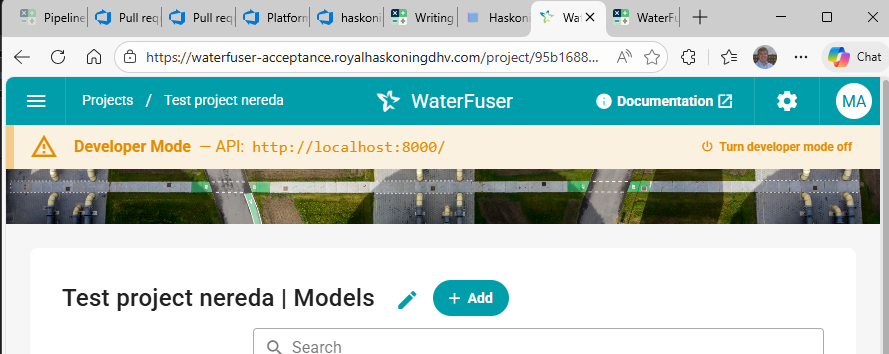
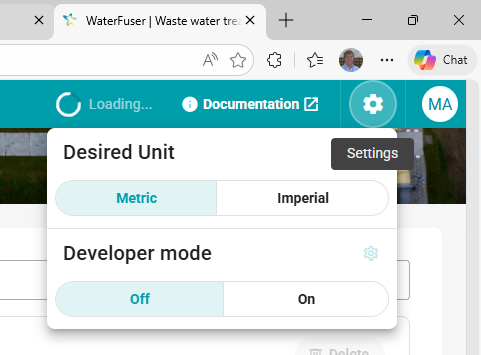
In the WaterFuser - acceptance environment, a developer mode is available so you can test local changes. Given that you have your api server running on localhost, you can point the frontend to this service.
To enable it, navigate to the settings menu and enable it:
After doing this, a status bar will appear to indicate you are now linked to your local api server: